ว่ากันว่า เฟอร์บี้ ถูกออกแบบมาเพื่อให้พูดกับเรา ในขณะที่ SiRi ของ Apple ถูกออกแบบมาเพื่อฟังสิ่งที่เราพูด ลองมาดูกันว่าเมื่อ "ผู้พูด" มาเจอ "ผู้ฟัง" อะไรจะเกิดขึ้น
Showing posts with label Technology. Show all posts
Showing posts with label Technology. Show all posts
Tuesday, June 4, 2013


Monday, April 1, 2013
Google Nose: From Text, Picture, Video and now Smell
มนุษย์เรามีประสพการณ์อยู่ 5 แบบด้วยกัน รูป,เสียง,กลิ่น,รส,สัมผัส แต่เราไม่สามารถนำประสพการณ์เหล่านี้เข้าสู่คอมพิวเตอร์ได้ทั้งหมด ที่เราทำได้หลักๆคือ รูป เช่น ข้อมูลข่าวสาร หรือจะเป็นรูปภาพ และเสียงเช่นเพลง เมื่อรวมรูปและเสียงเข้าด้วยกัน ก็จะกลายเป็นวีดีโอ ปัจจุบันเราสามารถได้รับประสพการณ์ทั้งภาพและเสียงผ่านอินเทอร์เน็ตได้แล้ว
ส่วนกลิ่น รส และสัมผัส ยังเป็นสิ่งที่ยากอยู่ แต่เร็วๆนี้ Google ได้มีโครงการใหม่ที่จะนำ 'กลิ่น' เข้าสู่โลกคอมพิวเตอร์ และจะช่วยให้คน Search หา 'กลิ่น' ที่เราอยากรู้ว่าเป็นอย่างไรได้ เช่น กลิ่นของดอกกุหลาย ถ้าใครไม่เคยดมก็คงไม่รู้ว่าเป็นอย่างไร
ตัวผมเองก็ยังสงสัยอยู่นะว่ามันจะเวิร์คจริงหรือเปล่า แต่นั่นไม่ใช่ประเด็นหลัก สิ่งสำคัญคือวิทยาการก้าวหน้าขึ้นทุกวัน วันนึงเราคงจะสามารถ เก็บกลิ่น และส่งกลิ่น แห่งความสุข ความอบอุ่นผ่านอินเทอร์เน็ตได้
Wednesday, January 9, 2013
Prime Number Animation
Prime number is a number which can be divided by itself and '1'. It could be hard to imaging what it's like if you are not a mathematician. Visit the following website. It's quite interesting.
http://www.datapointed.net/visualizations/math/factorization/animated-diagrams/
http://www.datapointed.net/visualizations/math/factorization/animated-diagrams/
Monday, January 7, 2013
Google Glasses! 4/4 [How it works]
This the last post. It shows how Google glasses works. It's a good attempts, but not complete. Well, Jeff Jarvin said in his book "What would google do?" (see the link below) that everything for Google is a beta. Google never waits for a complete product. It releases a usable product, and continue to improve it. Perhaps, in future, we might see a more complete Google Glasses.
How It Works
| There is a concern that I have: Privacy. Google is not the company who would care a lot about your privacy. You would never know that if your video feed is archived with google. Well, there's a old saying, convenient comes by the price of privacy and security. The list of Google glasses series
|
Google Glasses! 3/4 [A Baby]
This one is to use Google glasses as your camera. You can't hold your camera all the time. So you might miss a great moment. Here, Google glass can help. Plus, in some cases, it might not be a good idea to take a camera. But you can wear google glasses. Perhaps, some museum might even think that it's just another glasses.
The list of Google glasses series
Google Glasses and Your Baby
The list of Google glasses series
- Introduction and What Google glasses can do
- Google glasses in Fashion
- Google glasses and your baby
- How Google glasses works
Google Glasses! 2/4 [Fashion Industry]
Here is my second post in the series. Let's see what Fashion industry think of Google glasses.
The list of Google glasses series
Google Glasses in Fashion
The list of Google glasses series
- Introduction and What Google glasses can do
- Google glasses in Fashion
- Google glasses and your baby
- How Google glasses works
Google Glass! 1/4 [What It Can Do]
Google is working on an interesting virtual reality project. And, it has a prototype for sale! It's called "Google Glasses". Normally I don't post several videos consecutively. I do for this one. Here are the list.
The list of Google glasses series
- Introduction and What Google glasses can do
- Google glasses in Fashion
- Google glasses and your baby
- How Google glasses works
What Google glasses can do
Friday, January 4, 2013
Windows 8: A Small Demonstration
This is one of the greatest marketing campaign to demonstrate that Windows 8 is really simple. It took place in Lisbon, Portugal. Without any spoiler, I'll let you watch the video below. Enjoy :)
Tuesday, October 23, 2012
Cartoonize your picture with cartoonize.net
Wanna make your picture like a cartoon? I am looking for one, as I will use my cartoonized image for my new website. So, I went and looked online. I found "cartoonize.net". This picture lets you upload your image and apply cartoon effect to your picture. I tried it, and it's pretty cool. Here is the result:


The nice things about this website are
- It's free!
- You don't need to create any account. Just upload and choose your image
- You can download the image after it is cartoonized. There is a little watermark "cartoonized.net" on the bottom right corner. But you can crop it out.
There is a desktop version for $19.95, where you can convert your images in batch, and you can do it offline. To me, I think it's expensive because I'm a casual user. For now, online conversion is all I need.
Wednesday, September 12, 2012
Ghost in the Wires: My Adventures as the World's Most Wanted Hacker by Kevin Mitnick, Steve Wozniak, and William L. Simon
Rating: 4.5/5
Genre: Non-fiction, Biography
Book Review
Kevin Mitnick was a notorious hacker. He was very good at what he did. He was able to get into a lot of secured placed without getting caught for several years. But then, in the end, like most hackers, he got caught, served his term, and came out clean. Now, he is one of the most skillful security professional.
This book is based on his story. It starts since he was young. So, I kindda understand why he becomes a hackers. In a way, he’s like Steve Jobs. Mitnick and Jobs are geniuses. They are not happy with what traditional education can give them. So, they need to find a way out to express themselves. Jobs went on founding Apple, while Kevin turned out to be a hacker.
This book is not only fun, but also informative. Before reading this book, I know quite a bit about security. But still, I learned a lot more from this book. But don’t be scared by the term “security”. The content of this book is not very technical. This book is meant for general public. For example, to get confidential information, you just need to use “social engineering”. You just have to pretend to be one of employees who are allowed to have the information. How? Well, you just need to know how the inside people talk to each other. Then, you search for the right telephone numbers. You call them. You pretend to be one of them. And, people will give you the information you want. Most people are just too trusting. The question is do you have the guts to pull this off. Well, Mitnick does.
Saturday, November 5, 2011
In Year 2021
Remember, a Day Made Of Glass? It's the vision of Corning, a company which manufactures specialty glass and ceramics.
This time it's Microsoft. Let's see Microsoft's vision for year 2021.
Well, at least cars still run on tire...
I have one favor to ask. Talk to me. Tell me which technology is your favorite :)
Thursday, September 15, 2011
Google Map/Google Earth
The day Google Earth came out, the whole world was stunned. It's the first time we see the useful (and dangerous) civilian application. Starting from seeing the world, we can zoom in and see countries, districts, villages, and houses (including yours).
The day Google Earth came out, the whole world was stunned. It's the first time we see the useful (and dangerous) civilian application. Starting from seeing the world, we can zoom in and see countries, districts, villages, and houses (including yours).
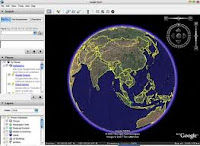 |
| This is what you see when you turn on Google Earth |
 |
| This is What you see When you look for a city |
Sunday, June 5, 2011
Windows 8!, What a Nice UI!
I just have a quick view at Windows 8. I really like its user interface! It's like a whole new world. What do you think?
Monday, May 16, 2011
To My FB's Friend, It's time to change password!
I first heard about this from Security Now shows that Symantec discovered the tokens to access your Facebook account has leaked.
Bad News:
If you use Facebook app and you gave that apps an access to your profile, you might want to read this. Usually, such the apps need to access your profile from times to times (e.g., post on the wall). The apps do not use your password to access your profile. They use Facebook-issued tokens to access your profile. The bad news is these token are leaked. Now, hackers can do whatever your apps can do.
Good News:
The fix is simple just change your Facebook's password. Then, Facebook will reissue the tokens to all your apps. The old tokens that hackers might get a hold of would expire.
Wanna know more?
You can read this link to find out the details.
Friday, January 14, 2011
Mac Book Pro Battery
ผมเพิ่งได้เครื่อง Mac Book Pro มา และพบว่าแบตเตอรี่ของเขามีความจุสูงมากๆ Apple อ้างว่าใช้ได้นานถึง 9 ชั่วโมง แต่ในเครื่องที่ผมใช้ก็คำนวณได้ 9 ชั่วโมงกว่าๆ ซึ่งก็นานมากอยู่ดี ถ้าต้องขึ้นเครื่องบินไปต่างประเทศ คงไม่ต้องกังวลเรื่องแบตเตอรี่หมดบนเครื่องอีกแล้ว
Wednesday, April 21, 2010
Commonly Used Windows Shortcuts
Are you using Windows 7? Do you perfer keyboards to mouse? If you do, you might want to read on.
I am a Windows user, and I hate to take my hands off the keyboards. I love shortcuts. I am quite happy that Zia Munshi compiled and published 20 commonly used short-cut on Windows website. In fact, I learned it from Windows Weekly Show with Leo Laporte and Paul Thurrott. Feel free to check their websites out.
I am a Windows user, and I hate to take my hands off the keyboards. I love shortcuts. I am quite happy that Zia Munshi compiled and published 20 commonly used short-cut on Windows website. In fact, I learned it from Windows Weekly Show with Leo Laporte and Paul Thurrott. Feel free to check their websites out.
Thursday, April 1, 2010
Text-to-speech and Audiobook
Texts are in a book. Speech is a form of audio. When we convert text to speech, we should get an audiobook, right? Not quite!! In fact, text-to-speed and audiobook are quite different.
Friday, March 26, 2010
My Question on the Security Now Show
Security Now!
 I have been following a Security Now! show for a while. It is a weekly show where Steve Gibson and Leo Laporte talk about Security. You can find the show at GRC or TWIT. But usually, I subscribe to its podcast version on i-Tune.
Why do I like this show
Steve Gibson is not only a Security Guru, but also the one who know how to make things easy. The show is fun and insightful. I have learned a lot listening to this show during past few years.

Why do I like this show
Steve Gibson is not only a Security Guru, but also the one who know how to make things easy. The show is fun and insightful. I have learned a lot listening to this show during past few years.
Monday, March 15, 2010
My online platform
List of my choice of online platforms
Currently, I have several online platform. Even I am confused sometimes. So, I decided to list the online platform, and their purpose (specific to me):
 Efficiently ways to interact with me
Currently, I have several online platform. Even I am confused sometimes. So, I decided to list the online platform, and their purpose (specific to me):
- My Personal Blog (http://t-issariyakul.blogspot.com/): This is the place where I post most of the stuff including 1) audiobook summary and review, technology, interesting stuff I see in life, and things about NS2. I am planning to move NS2 contents to NS2Ultimate website, and will lightly maintain NS2 contents at this site.
- NS2 Ultimate website (http://www.ns2ultimate.com/): This is the main page where I post tutorial and FAQ related NS2.
- Twitter: Everytime I create a new post. I will let people know by Twitter.
- Facebook: This is the place where I interact with my friends. Most of it would be personal things.
- Facebook fan page: All the above platform do not allow people I don't know to send me messages. Facebook fan page allows people I don't really know to communicate with me. The created content could be interesting to others.

- To read my contents, please visit my blogs at
- Blogspot: Audiobook, technology, other stuff
- NS2 Ultimate website: NS2 contents
- To comment on my post, please reply to my blog
- To talk to me (e.g., ask questions on a specific topic), please become a fan on my facebook fan page
- To become my friend, add me as a friend on facebook. But remember, Facebook has a limit on the number of friends you can have online. But I don't remember the number.
- To be informed of a post, please follow me on Twitter and all the above platforms.
Thursday, September 17, 2009
Crimson editor and Window Vista
CRIMSON EDITORS:
Crimson Editor is my favorite text editor. It is a free lightweight text editor (only 1.2 MB), and has several useful feature. The ones that I use the most are
Here is the link to the editor.
http://www.crimsoneditor.com/
PROBLEM WITH WINDOWS VISTA:
Unfortunately, UAC (User Account Control) of Windows Vista prevents the editor from using all its functionalities. For Crimson editor version 7, I cannot save the configuration of "User Tools". Once the editor is closed, the configuration is lost. When the editor is reopened, I have to reenter all the configuration for user tools.
To get around this problem, you have to right click on the Crimson Editor icon and click on "Run as administrator". By doing that, the configuration will be saved upon the exiting program.
Crimson Editor is my favorite text editor. It is a free lightweight text editor (only 1.2 MB), and has several useful feature. The ones that I use the most are
- Syntax highlighting
- Built-in and user-defined spell-checker
- User tools and macros: This is very cool. You can define any shortcut (e.g., Ctrl+1) in order to run any executable file on your system with various types of input argument (e.g., file title, filename (title + extension).
Here is the link to the editor.
http://www.crimsoneditor.com/
PROBLEM WITH WINDOWS VISTA:
Unfortunately, UAC (User Account Control) of Windows Vista prevents the editor from using all its functionalities. For Crimson editor version 7, I cannot save the configuration of "User Tools". Once the editor is closed, the configuration is lost. When the editor is reopened, I have to reenter all the configuration for user tools.
To get around this problem, you have to right click on the Crimson Editor icon and click on "Run as administrator". By doing that, the configuration will be saved upon the exiting program.
Subscribe to:
Posts (Atom)