Showing posts with label Software. Show all posts

Tuesday, October 23, 2012

Cartoonize your picture with cartoonize.net

Wanna make your picture like a cartoon? I am looking for one, as I will use my cartoonized image for my new website. So, I went and looked online. I found "cartoonize.net". This picture lets you upload your image and apply cartoon effect to your picture. I tried it, and it's pretty cool. Here is the result:


The nice things about this website are
  • It's free!
  • You don't need to create any account. Just upload and choose your image
  • You can download the image after it is cartoonized. There is a little watermark "cartoonized.net" on the bottom right corner. But you can crop it out. 


There is a desktop version for $19.95, where you can convert your images in batch, and you can do it offline. To me, I think it's expensive because I'm a casual user. For now, online conversion is all I need.

Saturday, September 19, 2009

iTune 9.0 and the missing podcasts

Can't find the content? Perhaps You are in the wrong country.

Do you know that iTune stores are different from countries to countries. If you are in an unfortunate country (e.g., Russia, Thailand). The content in the iTune store you see is quite limited. See below for example,
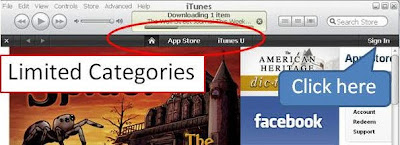


I am one of an unfortunate man, since the contents I like are mostly in the US. A fresh installation of iTune 9.0 does not allow me to see a wide variety of contents. On the other hand, people who install iTune 9.0 on a some country can access a lot more contents such as music, movies, podcasts, and so on. Look below for a screenshot for iTune stores in the US.


Unfortunately, my favorite podcasts (e.g., Security now, Businessweek, the world) are not available in some countries (including mine). By default, I cannot access the content I like.

Still want the content? Let's get around.

In order to browse, search, or download podcasts, I need to fool iTune that I am not at the place where I am (e.g, not in Russia or Thailand). iTune does not make that easy for the users. But I get aound it and here is how.

  1. Go to iTune store
  2. Click "Sign In" (see the picture above)
  3. Click "Create New Account"
  4. Click "Continue"
  5. Click on the arrow after "If the billing address of your payment information is not in the United STates, click here"
  6. Now you can change your iTune store to your favourite country, by choosing at "Select a country" and click "Change Country"
And now, you should be able to see the content as people in the US see. I wish Apple would make this process easier. If any of you know an easier way to do this, please let me know. I am curious to know how.

Thursday, September 17, 2009

Crimson editor and Window Vista

CRIMSON EDITORS:

Crimson Editor is my favorite text editor. It is a free lightweight text editor (only 1.2 MB), and has several useful feature. The ones that I use the most are
  1. Syntax highlighting
  2. Built-in and user-defined spell-checker
  3. User tools and macros: This is very cool. You can define any shortcut (e.g., Ctrl+1) in order to run any executable file on your system with various types of input argument (e.g., file title, filename (title + extension).
I am a LaTeX user. The above three functionalities are all I need to write LaTeX documents.

Here is the link to the editor.

http://www.crimsoneditor.com/

PROBLEM WITH WINDOWS VISTA:

Unfortunately, UAC (User Account Control) of Windows Vista prevents the editor from using all its functionalities. For Crimson editor version 7, I cannot save the configuration of "User Tools". Once the editor is closed, the configuration is lost. When the editor is reopened, I have to reenter all the configuration for user tools.

To get around this problem, you have to right click on the Crimson Editor icon and click on "Run as administrator". By doing that, the configuration will be saved upon the exiting program.