I just updated the NS2 lecture note at the following URL.
http://www.ece.ubc.ca/~teerawat/NS2.htm
They are now in one slide per page. Easier to read, eh? BTW, if you are an instructor and need a power point slide feel free to contact me, (Due to the spammer, I don't wanna give out my email here. My email is provided in the NS2 book), or you may put the comments on the blog.
Here is the book from Springer:
T. Issaraiyakul and E. Hossain, "Introduction to Network Simulator
NS2", Springer 2008.
http://www.springer.com/engineering/signals/book/978-0-387-71759-3
Wednesday, October 7, 2009


Sunday, September 27, 2009
[NS2] Deterministic v.s. Random
Deterministic Setting
By default, NS2 runs deterministic simulation. That is, you will get the same result for every run. The deterministic setting is usually good for debugging, where you would like to know what goes wrong at an exact point.
Random Setting
Statistical analysis involves running simulation for several times and find averages/variance for all the runs. NS2 is deterministic by default. The results from every run with default setting are the same, and the variance of the results is therefore zero. Statistical analysis require randomness so that the avarages and variances would be meaningful.
In order to introduce a randomness to NS2, you will need to insert the following line into the Tcl Simulation script prior to "$ns run":
$defaultRNG seed n
where as a seed for random number generator.
By default, NS2 sets n n to 101, by executing
$default seed 101
the result would be different from the result corresponding to the default setting. But all the result with n = 101 would still be the same.
For more information about Random Number Generators, see Chapter 12 in the following book from Springer:
T. Issaraiyakul and E. Hossain, "Introduction to Network Simulator
NS2", Springer 2008.
http://www.springer.com/engineering/signals/book/978-0-387-71759-3
You may also find the following website useful:
http://www.ece.ubc.ca/~teerawat/NS2.htm
By default, NS2 runs deterministic simulation. That is, you will get the same result for every run. The deterministic setting is usually good for debugging, where you would like to know what goes wrong at an exact point.
Random Setting
Statistical analysis involves running simulation for several times and find averages/variance for all the runs. NS2 is deterministic by default. The results from every run with default setting are the same, and the variance of the results is therefore zero. Statistical analysis require randomness so that the avarages and variances would be meaningful.
In order to introduce a randomness to NS2, you will need to insert the following line into the Tcl Simulation script prior to "$ns run":
$defaultRNG seed n
where
By default, NS2 sets n
$default seed 101
the result would be different from the result corresponding to the default setting. But all the result with n
T. Issaraiyakul and E. Hossain, "Introduction to Network Simulator
NS2", Springer 2008.
http://www.springer.com/engineering/signals/book/978-0-387-71759-3
You may also find the following website useful:
http://www.ece.ubc.ca/~teerawat/NS2.htm
Saturday, September 19, 2009
iTune 9.0 and the missing podcasts
Can't find the content? Perhaps You are in the wrong country.
Do you know that iTune stores are different from countries to countries. If you are in an unfortunate country (e.g., Russia, Thailand). The content in the iTune store you see is quite limited. See below for example,
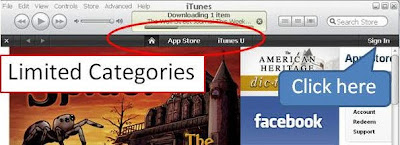
I am one of an unfortunate man, since the contents I like are mostly in the US. A fresh installation of iTune 9.0 does not allow me to see a wide variety of contents. On the other hand, people who install iTune 9.0 on a some country can access a lot more contents such as music, movies, podcasts, and so on. Look below for a screenshot for iTune stores in the US.
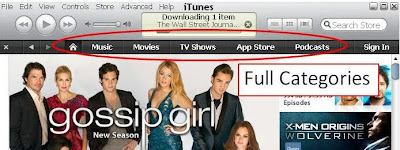
Unfortunately, my favorite podcasts (e.g., Security now, Businessweek, the world) are not available in some countries (including mine). By default, I cannot access the content I like.
Still want the content? Let's get around.
In order to browse, search, or download podcasts, I need to fool iTune that I am not at the place where I am (e.g, not in Russia or Thailand). iTune does not make that easy for the users. But I get aound it and here is how.
Do you know that iTune stores are different from countries to countries. If you are in an unfortunate country (e.g., Russia, Thailand). The content in the iTune store you see is quite limited. See below for example,

I am one of an unfortunate man, since the contents I like are mostly in the US. A fresh installation of iTune 9.0 does not allow me to see a wide variety of contents. On the other hand, people who install iTune 9.0 on a some country can access a lot more contents such as music, movies, podcasts, and so on. Look below for a screenshot for iTune stores in the US.

Unfortunately, my favorite podcasts (e.g., Security now, Businessweek, the world) are not available in some countries (including mine). By default, I cannot access the content I like.
Still want the content? Let's get around.
In order to browse, search, or download podcasts, I need to fool iTune that I am not at the place where I am (e.g, not in Russia or Thailand). iTune does not make that easy for the users. But I get aound it and here is how.
- Go to iTune store
- Click "Sign In" (see the picture above)
- Click "Create New Account"

- Click "Continue"

- Click on the arrow after "If the billing address of your payment information is not in the United STates, click here"

- Now you can change your iTune store to your favourite country, by choosing at "Select a country" and click "Change Country"


Thursday, September 17, 2009
Crimson editor and Window Vista
CRIMSON EDITORS:
Crimson Editor is my favorite text editor. It is a free lightweight text editor (only 1.2 MB), and has several useful feature. The ones that I use the most are
Here is the link to the editor.
http://www.crimsoneditor.com/
PROBLEM WITH WINDOWS VISTA:
Unfortunately, UAC (User Account Control) of Windows Vista prevents the editor from using all its functionalities. For Crimson editor version 7, I cannot save the configuration of "User Tools". Once the editor is closed, the configuration is lost. When the editor is reopened, I have to reenter all the configuration for user tools.
To get around this problem, you have to right click on the Crimson Editor icon and click on "Run as administrator". By doing that, the configuration will be saved upon the exiting program.
Crimson Editor is my favorite text editor. It is a free lightweight text editor (only 1.2 MB), and has several useful feature. The ones that I use the most are
- Syntax highlighting
- Built-in and user-defined spell-checker
- User tools and macros: This is very cool. You can define any shortcut (e.g., Ctrl+1) in order to run any executable file on your system with various types of input argument (e.g., file title, filename (title + extension).
Here is the link to the editor.
http://www.crimsoneditor.com/
PROBLEM WITH WINDOWS VISTA:
Unfortunately, UAC (User Account Control) of Windows Vista prevents the editor from using all its functionalities. For Crimson editor version 7, I cannot save the configuration of "User Tools". Once the editor is closed, the configuration is lost. When the editor is reopened, I have to reenter all the configuration for user tools.
To get around this problem, you have to right click on the Crimson Editor icon and click on "Run as administrator". By doing that, the configuration will be saved upon the exiting program.
Sunday, August 9, 2009
Packet Forwarding Mechanism
In NS2, objects that are able to pass packets around are called NsObject. They are the objects derived from class NsObject. Class NsObject declares function recv(p,h) as pure virtual, forcing its derived class to specify how a packet is received. For example,
In general, an NsObject forwards packets in two following ways:
The handler is optional for immediate packet forwarding. It is not used when executing recv(p,h). We can simply provide the "h" as a null pointer. However, in some cases, the handler will be passed to the downstream objects. At the place where a delayed packet forwarding is invoked, the handler "h" will be used as an input argument.
For more information about NsObject and packet forwarding, see the
following book from Springer:
T. Issaraiyakul and E. Hossain, "Introduction to Network Simulator
NS2", Springer 2008.
http://www.springer.com/engineering/signals/book/978-0-387-71759-3
You may also find the following website useful:
http://www.ece.ubc.ca/~teerawat/NS2.htm
- Once a connector receives a packet, it immediately passes the packet to its forwarding object.
- Once a queue receives a packet, it puts the packet in its buffer. The queue will send out only the head-of-the-line packet.
In general, an NsObject forwards packets in two following ways:
- Immediate packet forwarding: A packet forwarder forwards a packet as soon as it receives the packet. The packet receiver receives the packet at the same time as the packet forwarder does. For example, a Connector forwards a packet to its downstream object by invoking target_->recv(p,h). In this case, the packet receiver (i.e., "*target_") receives the packet "*p" at the same time as the Connector does.
- Delayed packet forwarding: To delay packet forwarding, the packet "*p" is cast to be an Event object, associated with a packet receiving NsObject (i.e., handler "*h"), and placed on the simulation timeline at a given simulation time"t". This is to schedule a packet reception event at time "t". When the simulation runs to time "t", function handle of the NsObject "*h" is invoked. From within function NsObject::handle, function recv is executed, and the packet "*p" is received by the NsObject "*h".
The handler is optional for immediate packet forwarding. It is not used when executing recv(p,h). We can simply provide the "h" as a null pointer. However, in some cases, the handler will be passed to the downstream objects. At the place where a delayed packet forwarding is invoked, the handler "h" will be used as an input argument.
For more information about NsObject and packet forwarding, see the
following book from Springer:
T. Issaraiyakul and E. Hossain, "Introduction to Network Simulator
NS2", Springer 2008.
http://www.springer.com/engineering/signals/book/978-0-387-71759-3
You may also find the following website useful:
http://www.ece.ubc.ca/~teerawat/NS2.htm
Tuesday, July 28, 2009
[AIT09] ARQ Transmitter
This question is from Thanapol, 107929.
- What is responsibility of tARQ_ in ACK passing?
- What is the base class of ARQRx and ARQTx ?
Sunday, July 26, 2009
[AIT09] TCP Agent
This question is from Rujipol:
- Why does a TCP protocol need 3-way handshake? When does it being used?
- What does functionalities that TCP have that UDP does not have?
- What does variable "reason" in ~/tcp.h do? When does it being used?
- How many error control mechanism does TCP have? What are they?
Subscribe to:
Posts (Atom)